> ## Documentation Index
> Fetch the complete documentation index at: https://docs.neuroscale.ai/llms.txt
> Use this file to discover all available pages before exploring further.
# Credit Usage
> Understand and manage your Arbi credits
## What are Arbi credits?
Credits are the currency that powers key actions across the Arbi platform. They give you access to candidate emails, phone numbers, AI-powered signals, and branded profile exports, helping you reach the right talent with personalized precision.
Every Arbi plan includes a monthly credit allocation shared across your team. Credits are consumed when you perform specific actions like revealing contact information, running signal enrichment, or exporting candidate profiles. Once a credit is spent on a candidate, that data stays unlocked for your entire organization permanently.
 ## What credits can be spent on
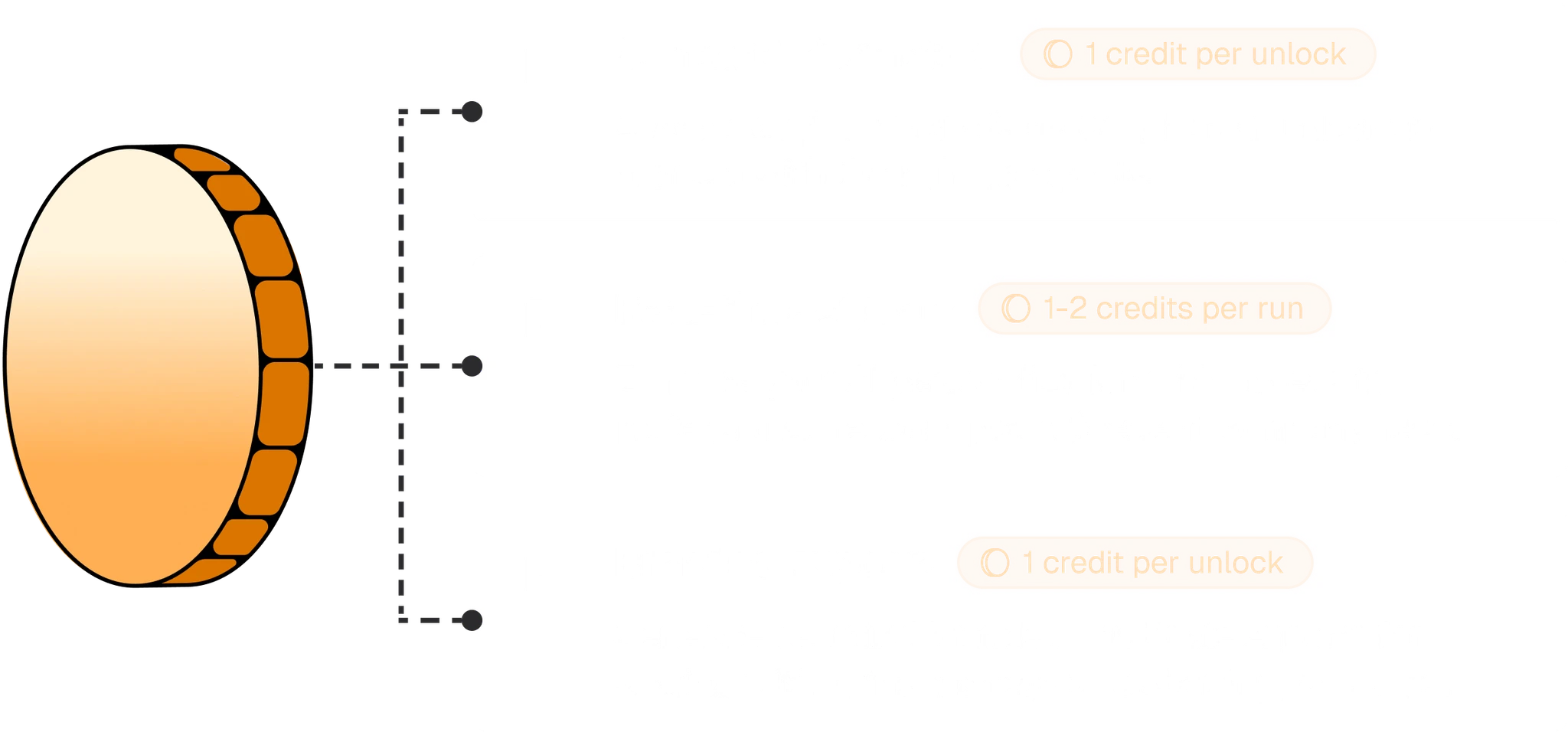
| Action | Credit cost | Details |
| ---------------------- | ---------------------- | ---------------------------------------------------------------------------------------------------------------- |
| Contact data reveal | 1 credit per candidate | Unlocks all personal emails, professional emails, and phone numbers. See [Contact data](/sourcing/contact-data). |
| Signal enrichment | 1-2 credits per run | AI-powered real-time personalization signals for outreach. See [AI prompts](/outreach/ai-prompts). |
| Branded profile export | 1 credit per export | Export candidate profiles with your company branding. See [Branded exports](/sourcing/branded-exports). |
## Credit allocations by plan
Every plan includes a monthly credit pool shared across all seats in your organization. Annual plans receive the full year's allocation. For monthly billing, divide the annual totals below by 12.
| | **Growth** | **Business** | **Enterprise** |
| ----------------------------------------- | -------------- | -------------- | -------------- |
| **Annual credit allocation** | 24,000 Credits | 36,000 Credits | Custom |
| **Cost per additional credit** | \$0.20 | \$0.15 | Volume pricing |
| **Active jobs** | Up to 5 | Up to 10 | Unlimited |
| **Mailboxes per user** | Up to 3 | Up to 6 | Unlimited |
| **Talent searches** | Unlimited | Unlimited | Unlimited |
| **Arbitrator usage** | Unlimited | Unlimited | Unlimited |
| **Outreach sequences** | Unlimited | Unlimited | Unlimited |
| **LinkedIn automation** | Unlimited | Unlimited | Unlimited |
| **Sourcing agents** | - | Unlimited | Unlimited |
| **AI personalization signals** | - | Included | Included |
| **Branded profile exports** | - | Included | Included |
| **ATS integrations + Talent Rediscovery** | - | - | Included |
| **SSO/SAML/SCIM** | - | - | Included |
| **Dedicated CSM** | - | - | Included |
Business is the most popular plan. It includes real-time AI personalization signals, branded profile exports, priority support, and unlimited sourcing agents.
## How to use credits
Credits are consumed automatically when you take an action that requires them. You do not need to manually assign or allocate credits.
* **Reveal contact data** - open any candidate profile and click **Reveal Contact Details**. All available emails and phone numbers are unlocked for 1 credit. Learn more in [Contact data](/sourcing/contact-data).
* **Run signal enrichment** - use AI-powered signals to generate personalized outreach context for a candidate. Each signal run costs 1-2 credits depending on depth. Learn more in [AI prompts](/outreach/ai-prompts).
* **Export branded profiles** - export a candidate's profile with your company branding applied. Each export costs 1 credit. Learn more in [Branded exports](/sourcing/branded-exports).
## How to manage credits
Credit management lives in **Settings > Billing**. From there you can see your current plan, total credit usage, and a breakdown by category.
## What credits can be spent on
| Action | Credit cost | Details |
| ---------------------- | ---------------------- | ---------------------------------------------------------------------------------------------------------------- |
| Contact data reveal | 1 credit per candidate | Unlocks all personal emails, professional emails, and phone numbers. See [Contact data](/sourcing/contact-data). |
| Signal enrichment | 1-2 credits per run | AI-powered real-time personalization signals for outreach. See [AI prompts](/outreach/ai-prompts). |
| Branded profile export | 1 credit per export | Export candidate profiles with your company branding. See [Branded exports](/sourcing/branded-exports). |
## Credit allocations by plan
Every plan includes a monthly credit pool shared across all seats in your organization. Annual plans receive the full year's allocation. For monthly billing, divide the annual totals below by 12.
| | **Growth** | **Business** | **Enterprise** |
| ----------------------------------------- | -------------- | -------------- | -------------- |
| **Annual credit allocation** | 24,000 Credits | 36,000 Credits | Custom |
| **Cost per additional credit** | \$0.20 | \$0.15 | Volume pricing |
| **Active jobs** | Up to 5 | Up to 10 | Unlimited |
| **Mailboxes per user** | Up to 3 | Up to 6 | Unlimited |
| **Talent searches** | Unlimited | Unlimited | Unlimited |
| **Arbitrator usage** | Unlimited | Unlimited | Unlimited |
| **Outreach sequences** | Unlimited | Unlimited | Unlimited |
| **LinkedIn automation** | Unlimited | Unlimited | Unlimited |
| **Sourcing agents** | - | Unlimited | Unlimited |
| **AI personalization signals** | - | Included | Included |
| **Branded profile exports** | - | Included | Included |
| **ATS integrations + Talent Rediscovery** | - | - | Included |
| **SSO/SAML/SCIM** | - | - | Included |
| **Dedicated CSM** | - | - | Included |
Business is the most popular plan. It includes real-time AI personalization signals, branded profile exports, priority support, and unlimited sourcing agents.
## How to use credits
Credits are consumed automatically when you take an action that requires them. You do not need to manually assign or allocate credits.
* **Reveal contact data** - open any candidate profile and click **Reveal Contact Details**. All available emails and phone numbers are unlocked for 1 credit. Learn more in [Contact data](/sourcing/contact-data).
* **Run signal enrichment** - use AI-powered signals to generate personalized outreach context for a candidate. Each signal run costs 1-2 credits depending on depth. Learn more in [AI prompts](/outreach/ai-prompts).
* **Export branded profiles** - export a candidate's profile with your company branding applied. Each export costs 1 credit. Learn more in [Branded exports](/sourcing/branded-exports).
## How to manage credits
Credit management lives in **Settings > Billing**. From there you can see your current plan, total credit usage, and a breakdown by category.
 ### Viewing usage details
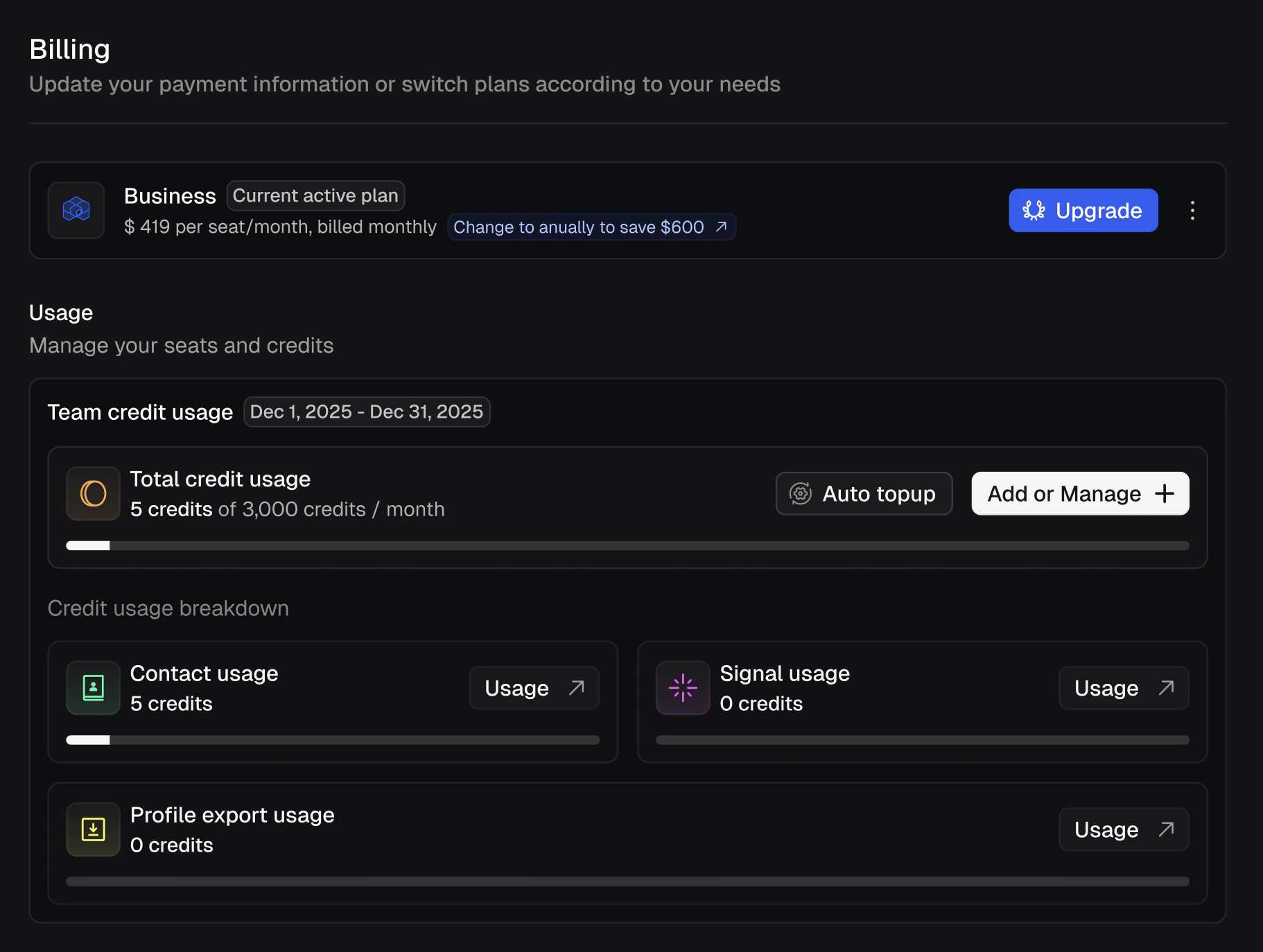
The billing page shows your **Team credit usage** for the current billing period with a progress bar and count (e.g. "5 credits of 3,000 credits / month"). Below that, the **Credit usage breakdown** splits usage into three categories:
* **Contact usage** - credits spent on contact data reveals.
* **Signal usage** - credits spent on AI signal enrichment.
* **Profile export usage** - credits spent on branded candidate exports.
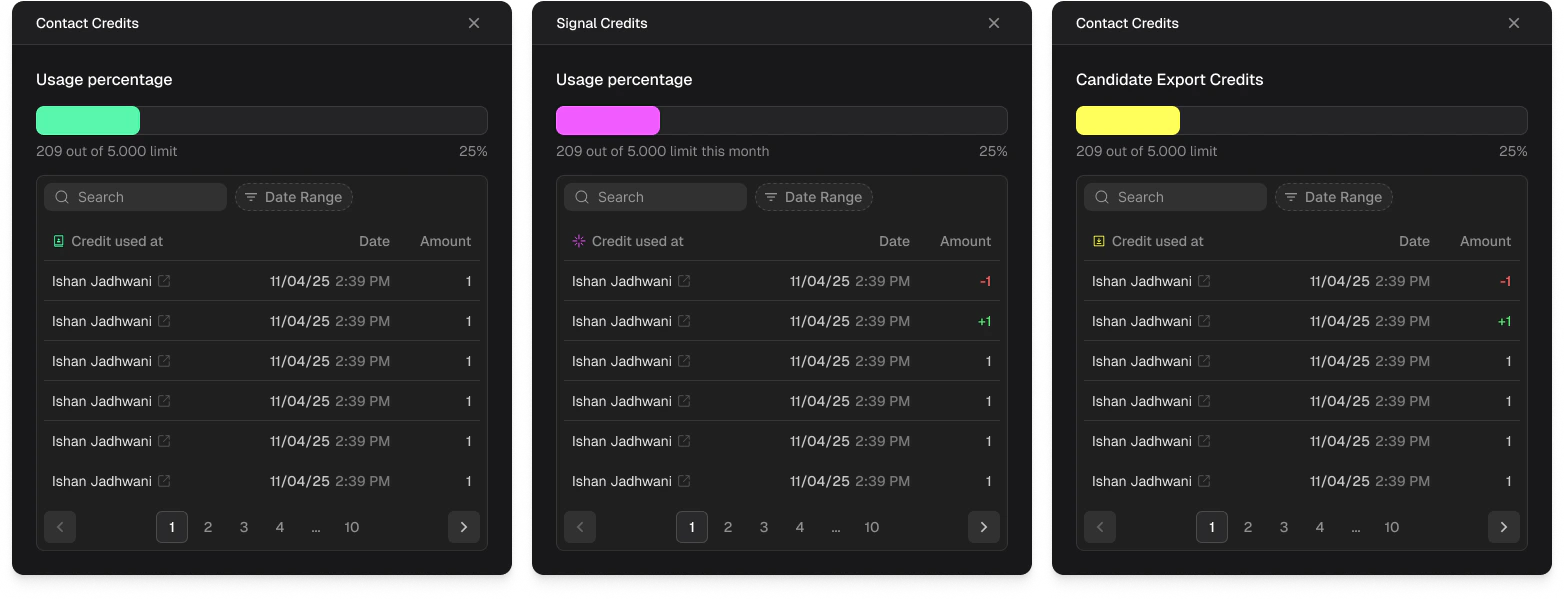
Click the **Usage** link on any category to see a detailed log of every credit spent, including who used it, the date and time, and the amount. Entries marked with **-1** indicate a credit spent, and **+1** indicates a credit refunded.
### Viewing usage details
The billing page shows your **Team credit usage** for the current billing period with a progress bar and count (e.g. "5 credits of 3,000 credits / month"). Below that, the **Credit usage breakdown** splits usage into three categories:
* **Contact usage** - credits spent on contact data reveals.
* **Signal usage** - credits spent on AI signal enrichment.
* **Profile export usage** - credits spent on branded candidate exports.
Click the **Usage** link on any category to see a detailed log of every credit spent, including who used it, the date and time, and the amount. Entries marked with **-1** indicate a credit spent, and **+1** indicates a credit refunded.
 ### Auto top-up
Enable **Auto topup** from the billing page to automatically purchase additional credits when your team runs low. This prevents interruptions during active sourcing campaigns.
### Purchasing additional credits
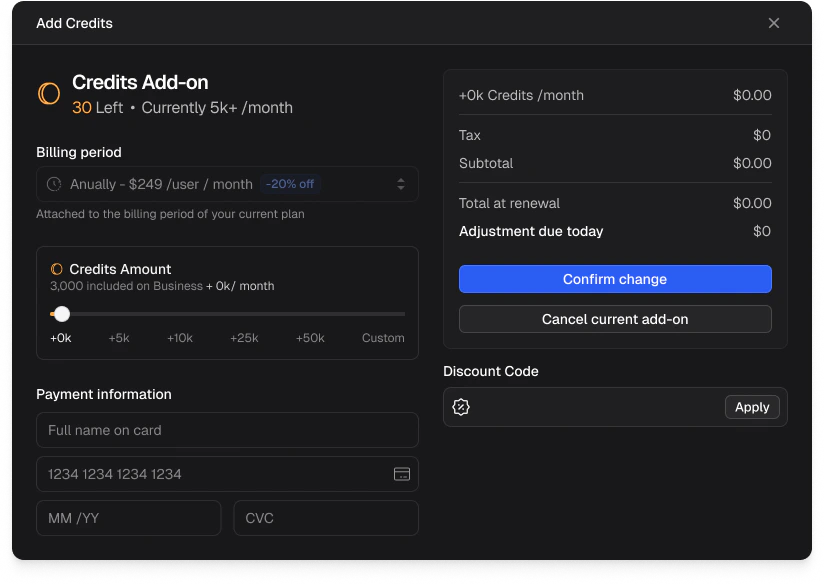
If you need more credits beyond your plan's monthly allocation, click **Add or Manage** on the billing page. The **Credits Add-on** panel lets you purchase additional credit packs on top of your seat pool.
Choose from preset amounts (+5k, +10k, +25k, +50k) or enter a custom amount. Add-ons are billed on your existing billing cycle (monthly or annually) and are applied immediately. You can also enter a **Discount Code** if you have one.
### Auto top-up
Enable **Auto topup** from the billing page to automatically purchase additional credits when your team runs low. This prevents interruptions during active sourcing campaigns.
### Purchasing additional credits
If you need more credits beyond your plan's monthly allocation, click **Add or Manage** on the billing page. The **Credits Add-on** panel lets you purchase additional credit packs on top of your seat pool.
Choose from preset amounts (+5k, +10k, +25k, +50k) or enter a custom amount. Add-ons are billed on your existing billing cycle (monthly or annually) and are applied immediately. You can also enter a **Discount Code** if you have one.
 ## Frequently asked questions
No. Unused credits do not roll over. Any credits remaining at the end of your billing period will reset when your new allocation begins.
Yes. Credits are pooled at the organization level and shared across all seats. Any team member can use credits, and usage is tracked per user in the billing logs.
You can purchase additional credit packs at any time from the billing page, or enable Auto topup to avoid running out during active campaigns.
No. Once contact data or signals have been revealed for a candidate, that data is unlocked permanently for your organization. No additional credits are spent on the same candidate.
If a reveal returns no data, the credit is not charged. For other refund questions, contact support.
## Frequently asked questions
No. Unused credits do not roll over. Any credits remaining at the end of your billing period will reset when your new allocation begins.
Yes. Credits are pooled at the organization level and shared across all seats. Any team member can use credits, and usage is tracked per user in the billing logs.
You can purchase additional credit packs at any time from the billing page, or enable Auto topup to avoid running out during active campaigns.
No. Once contact data or signals have been revealed for a candidate, that data is unlocked permanently for your organization. No additional credits are spent on the same candidate.
If a reveal returns no data, the credit is not charged. For other refund questions, contact support.