> ## Documentation Index
> Fetch the complete documentation index at: https://docs.neuroscale.ai/llms.txt
> Use this file to discover all available pages before exploring further.
# Contact Data
> Reveal and manage candidate contact information
Every candidate profile in Arbi can have its contact data unlocked. Contact reveals include **personal emails**, **professional emails**, and **phone numbers**, all enriched across 10+ data vendors for the best possible accuracy and coverage. A single reveal costs **1 credit** and unlocks all available contact information for that candidate at once.
Once a candidate's contact data has been unlocked by anyone in your organization, it stays unlocked permanently. You will never be charged credits for the same candidate again.
To learn more about how credits work, allocations, and spending, see [Credit usage](/credit-usage).
## How to reveal contact data
Navigate to any candidate from [Talent Search](/sourcing/talent-search) results or from an imported candidate inside a job. Click the arrow on the candidate card to open their full profile.
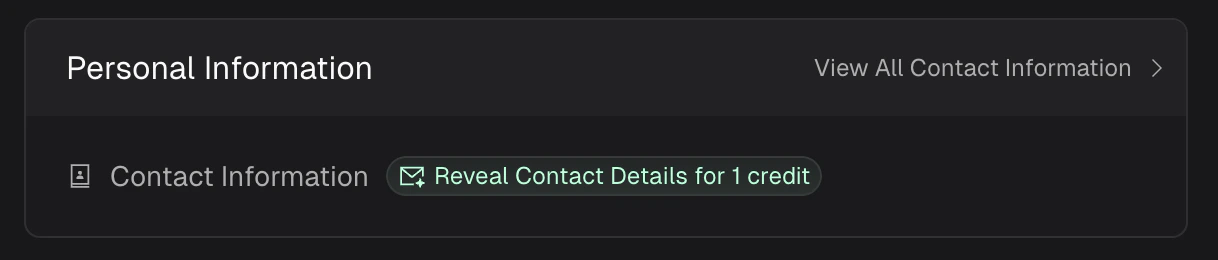
Inside the profile, look for the **Personal Information** section. You will see a green **Reveal Contact Details for 1 credit** button next to Contact Information.
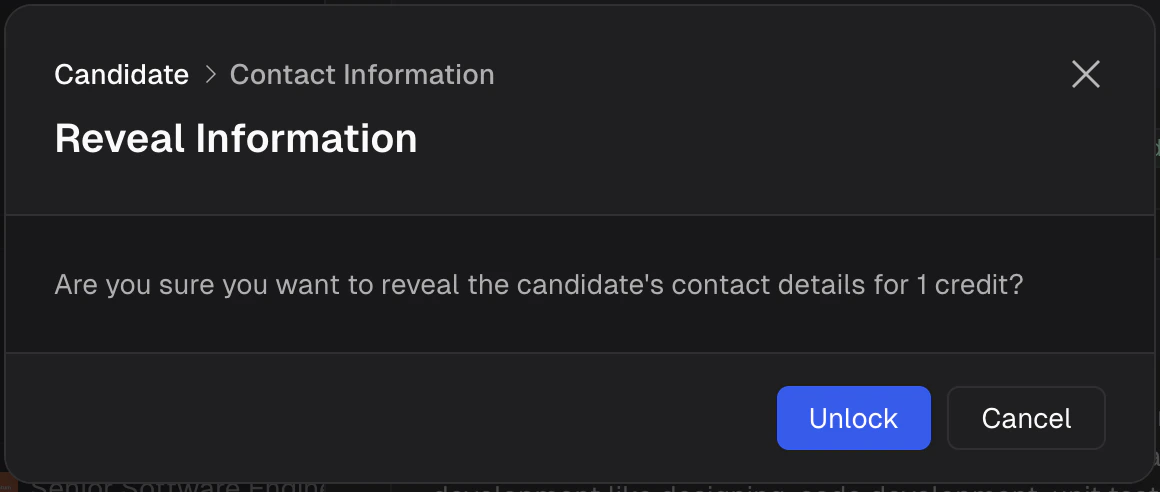
 A confirmation dialog will appear asking "Are you sure you want to reveal the candidate's contact details for 1 credit?" Click **Unlock** to proceed or **Cancel** to go back.
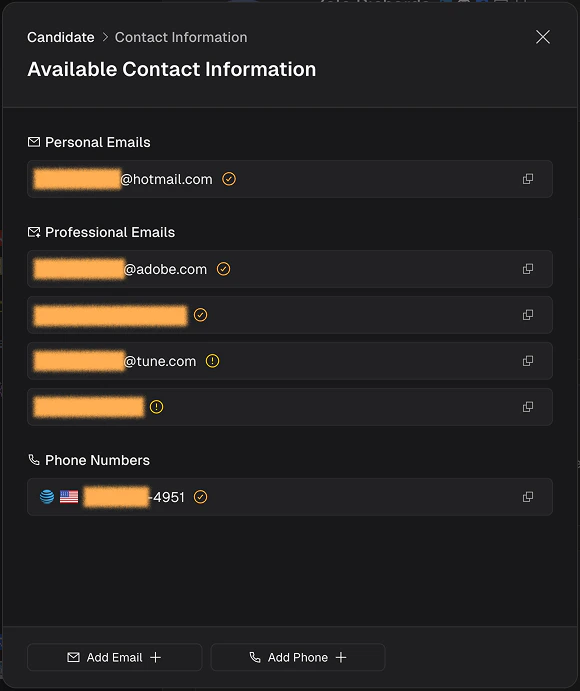
 Once unlocked, the contact information panel opens with all available data organized into three sections: **Personal Emails**, **Professional Emails**, and **Phone Numbers**. Each entry has a copy button for quick access.
 ## Email verification status
Every email returned by a contact reveal is automatically verified for deliverability. A status icon appears next to each email so you know how reliable it is before you reach out.
| Icon | Status | What it means |
| ------------------ | ----------------- | ------------------------------------------------------------------------------------------------- |
| Gold checkmark | **Verified** | The email has been confirmed as low risk and deliverable. Safe to use for outreach. |
| Yellow exclamation | **Risky** | The email appears deliverable but may be a catch-all, shared inbox, or similar. Use with caution. |
| Red X | **Undeliverable** | The email is invalid or no longer active. Do not use for outreach. |
| Gray question mark | **Unknown** | Deliverability could not be determined. The email may still work but has not been confirmed. |
Prioritize emails marked with the gold checkmark for your sequences. If only risky or unknown emails are available, consider verifying them with a secondary tool before sending at scale.
## What is included in a reveal
Every contact reveal returns all available data for a flat cost of **1 credit**. There is no per-field or per-type charge.
* **Personal emails** - the candidate's personal or non-work email addresses.
* **Professional emails** - work email addresses tied to current or past employers.
* **Phone numbers** - mobile and direct phone numbers with country flags for easy identification.
Contact data is enriched in real time across 10+ vendors when you click **Unlock**. This means you are getting the most up-to-date information available at the time of the reveal, not a cached snapshot.
## Adding contact data manually
If you have contact information that Arbi did not return, you can add it directly from the contact panel. Use the **Add Email** or **Add Phone** buttons at the bottom of the panel to append custom entries to the candidate's profile.
## Frequently asked questions
No. Once contact data is revealed for a candidate, it is unlocked for your entire organization permanently. No additional credits will be spent on that candidate.
Yes. If a candidate has been imported into a job, you can open their profile from the job view and reveal contact data the same way.
In rare cases, a reveal may return limited or no results. If no data is found, the credit is not charged.
Arbi enriches across 10+ data vendors and verifies every email for deliverability. Accuracy depends on the candidate's digital footprint, but the multi-vendor approach ensures the broadest possible coverage.
Phone numbers display a country flag for identification. Deliverability verification currently applies to email addresses only.
## Email verification status
Every email returned by a contact reveal is automatically verified for deliverability. A status icon appears next to each email so you know how reliable it is before you reach out.
| Icon | Status | What it means |
| ------------------ | ----------------- | ------------------------------------------------------------------------------------------------- |
| Gold checkmark | **Verified** | The email has been confirmed as low risk and deliverable. Safe to use for outreach. |
| Yellow exclamation | **Risky** | The email appears deliverable but may be a catch-all, shared inbox, or similar. Use with caution. |
| Red X | **Undeliverable** | The email is invalid or no longer active. Do not use for outreach. |
| Gray question mark | **Unknown** | Deliverability could not be determined. The email may still work but has not been confirmed. |
Prioritize emails marked with the gold checkmark for your sequences. If only risky or unknown emails are available, consider verifying them with a secondary tool before sending at scale.
## What is included in a reveal
Every contact reveal returns all available data for a flat cost of **1 credit**. There is no per-field or per-type charge.
* **Personal emails** - the candidate's personal or non-work email addresses.
* **Professional emails** - work email addresses tied to current or past employers.
* **Phone numbers** - mobile and direct phone numbers with country flags for easy identification.
Contact data is enriched in real time across 10+ vendors when you click **Unlock**. This means you are getting the most up-to-date information available at the time of the reveal, not a cached snapshot.
## Adding contact data manually
If you have contact information that Arbi did not return, you can add it directly from the contact panel. Use the **Add Email** or **Add Phone** buttons at the bottom of the panel to append custom entries to the candidate's profile.
## Frequently asked questions
No. Once contact data is revealed for a candidate, it is unlocked for your entire organization permanently. No additional credits will be spent on that candidate.
Yes. If a candidate has been imported into a job, you can open their profile from the job view and reveal contact data the same way.
In rare cases, a reveal may return limited or no results. If no data is found, the credit is not charged.
Arbi enriches across 10+ data vendors and verifies every email for deliverability. Accuracy depends on the candidate's digital footprint, but the multi-vendor approach ensures the broadest possible coverage.
Phone numbers display a country flag for identification. Deliverability verification currently applies to email addresses only.